
Windows Clean Access Agent Version 4.1.7 Released - Sept 30th
In this release their are a few minor resolved caveats:
- Symantec AntiVirus 10.x not fully compatible with CCA Agent
- Vista Agent does not detect MAC Address of Wireless NIC
- AVG Anti-Virus Free 8.x support for Virus Definition check
As with all upgrades, it is highly recommended to read the release notes before upgrading. Also, on a side note, remember that upgrades should be done for a purpose, either to fix a caveat or to gain new features.
Download 4.1.7 Windows Agent
Release Notes
3 NEW Configuration Examples posted to CCO
- NAC Appliance (CCA): Configure High Availability (HA) for the Clean Access Manager (CAM)
29/Sep/2008
- Deploy NAC Profiler in an Existing Out-of-Band NAC
02/Sep/2008
- Importing SSL Certificates to NAC Profiler
02/Sep/2008
To see all the previous Configuration Examples and TechNotes
How to Block Operating Systems with CCA
A friend of mine, Rob Chee, writes a blog on network security and had a great post on how to block operating systems using User Pages with CCA.
Make sure you check out his Post.
Tuesday, September 30, 2008


Thursday, July 31, 2008
New Configuration Example: Configure Guest Access
Cisco posted a new Configuration Guide:
NAC: Configure Guest Access
This example will walk you through how to configure the various types of guest access on the Cisco Clean Access or NAC appliance.
To see all the previous Configuration Examples and TechNotes
NAC: Configure Guest Access
This example will walk you through how to configure the various types of guest access on the Cisco Clean Access or NAC appliance.
To see all the previous Configuration Examples and TechNotes
NEW NAC Version 4.1(6)
4.1.6 is available and you can download it here:
Cisco NAC Appliance Software Download Page
Requires a valid Smartnet contract in order to download

4.1(6) Release Notes
As with all NAC Upgrades, the release notes are extremely important!
4.1(6) CAM Installation & Configuration Guide
4.1(6) CAS Installation & Configuration Guide
Cisco NAC Appliance Software Download Page
Requires a valid Smartnet contract in order to download
4.1(6) Release Notes
As with all NAC Upgrades, the release notes are extremely important!
4.1(6) CAM Installation & Configuration Guide
4.1(6) CAS Installation & Configuration Guide
Wednesday, July 16, 2008
Ask the Expert - Cisco NAC Guest Server
Click Here to Begin
This is a great forum to ask your NAC Guest Server questions. Syed is apart of the stellar NAC business unit and focuses on Guest Server. Please read the detailed description below:
This is an opportunity to get an update on the new Cisco NAC Guest Server which works with either Cisco NAC Appliance or Cisco wireless LAN controllers to manage the entire lifecycle of guest access with Cisco expert Syed Ghayur. Syed is a technical marketing engineer in the product marketing team for the Cisco Network Access Control (NAC) Appliance. He also works on global scalability of the product, documentation, partner training, and system engineer trainings. In addition, he works closely with the Cisco Technical Assistance Center (TAC) to resolve complex issues and product related bugs. Early this year, he joined the Security Technology Group (STG) as technical marketing engineer for NAC Appliance.
Remember to use the rating system to let Syed know if you have received an adequate response.
Syed might not be able to answer each question due to the volume expected during this event. Our moderators will post many of the unanswered questions in other discussion forums shortly after the event. This event lasts through July 25, 2008. Visit this forum often to view responses to your questions and the questions of other community members.
This is a great forum to ask your NAC Guest Server questions. Syed is apart of the stellar NAC business unit and focuses on Guest Server. Please read the detailed description below:
This is an opportunity to get an update on the new Cisco NAC Guest Server which works with either Cisco NAC Appliance or Cisco wireless LAN controllers to manage the entire lifecycle of guest access with Cisco expert Syed Ghayur. Syed is a technical marketing engineer in the product marketing team for the Cisco Network Access Control (NAC) Appliance. He also works on global scalability of the product, documentation, partner training, and system engineer trainings. In addition, he works closely with the Cisco Technical Assistance Center (TAC) to resolve complex issues and product related bugs. Early this year, he joined the Security Technology Group (STG) as technical marketing engineer for NAC Appliance.
Remember to use the rating system to let Syed know if you have received an adequate response.
Syed might not be able to answer each question due to the volume expected during this event. Our moderators will post many of the unanswered questions in other discussion forums shortly after the event. This event lasts through July 25, 2008. Visit this forum often to view responses to your questions and the questions of other community members.
Tuesday, June 24, 2008
NAC Manager (CAM) Backups
Background:
The Cisco NAC Manager is the brain of the Cisco NAC solution. All configuration is stored in a database which makes the solution scalable. With that said, a crucial step in any deployment is developing a backup plan to ensure that if the NAC Manager or Failover Pair fails(Hardware failure, database corruption, administrator configuration mistake, fire, flood, sinkhole, etc.) the database can be restored and everything will be back up and working!
What gets backed up:
Everything that is stored in the database gets backed up. The following is a list of items that get backed up:
o Clean Access Server Configuration information (DHCP, Managed Subnets, VLAN Mapping, Static Routes, filters, etc.)
o Filters (Device Filters, Subnet Filters)
o Posture Assessment (Checks, Rules, Requirements,etc)
o Switch Management
o User Management (User Roles, Auth Servers, User Pages, Admin Users)
o Reports
o Licenses
What doesn't get backed up:
The less talked about item is what is not backed up. The following is a list of things that must be backed up manually during deployment and are not included in the database backup:
o Initial Configuration Information (service perfigo config) for the Managers and Servers. This means that good documentation of the initial network placement and ip addresses is a MUST.
o Failover Configuration (Good documentation will be the solution)
o Certificates (This is the #1 forgotten piece of information) Make sure to backup the private keys, root certificates, and CAM/CAS Certificates
Manual Backups:
The NAC Manager supports manual backups by going to administration -> backup, name the snapshot and hit "Create Snapshot". The snapshot may be downloaded to the local pc, if desired.

Automatic On-Box Backups:
The NAC Manager automatically creates daily snapshots of the Clean Access Manager database and preserves the most recent from the last 30 days. It also automatically creates snapshots before and after software upgrades, and before and after failover events. No configuration is required to enable these automatic backups. These backups are stored at /perfigo/backup directory.

Automatic Off-Box Backups:
The first two methods are great, but what happens if the CAM gets caught in a fire? This is why creating a backup strategy to include automatically sending backups to another device that will not take the same hit as the CAM(Think different location) is vital. Cisco has provided a script located on the CAM(/perfigo/control/bin/) called pg_backup that will take a database backup and send it to an external FTP server. The following is a list of procedures to use the pg_backup script to send your DB backup to a ftp server nightly(See example for details):
o Login to the CAM as root
o cd /perfigo/control/bin
o Test using the pg_backup script
o Create a crontab file to use with cron (Example shows running pg_backup every morning at 2:30am)
o Import the crontab file
o Verify the file imported correctly
 If ftp is not available within an organization SCP/NFS/SFTP may be utilized by creating a custom backup script or hiring a consultant to create one for the organization. Also, please note the pg_backup script names the file "csdb.gz". In order to keep multiple backups, create a backup rotation script on the ftp server or modify pg_backup to include a date.
Summary:
Backups are vital to ensuring NAC will be up and running quickly through any failure. Be sure with any deployment a strong backup strategy is included.
Sources: CAM Installation & Configuration Guide v4.1.3
Coming Up Next: Restores
Happy Cisco-Live week to everyone attending in Orlando and make sure to sign up for the NAC Deployment or NAC Troubleshooting session.
The Cisco NAC Manager is the brain of the Cisco NAC solution. All configuration is stored in a database which makes the solution scalable. With that said, a crucial step in any deployment is developing a backup plan to ensure that if the NAC Manager or Failover Pair fails(Hardware failure, database corruption, administrator configuration mistake, fire, flood, sinkhole, etc.) the database can be restored and everything will be back up and working!
What gets backed up:
Everything that is stored in the database gets backed up. The following is a list of items that get backed up:
o Clean Access Server Configuration information (DHCP, Managed Subnets, VLAN Mapping, Static Routes, filters, etc.)
o Filters (Device Filters, Subnet Filters)
o Posture Assessment (Checks, Rules, Requirements,etc)
o Switch Management
o User Management (User Roles, Auth Servers, User Pages, Admin Users)
o Reports
o Licenses
What doesn't get backed up:
The less talked about item is what is not backed up. The following is a list of things that must be backed up manually during deployment and are not included in the database backup:
o Initial Configuration Information (service perfigo config) for the Managers and Servers. This means that good documentation of the initial network placement and ip addresses is a MUST.
o Failover Configuration (Good documentation will be the solution)
o Certificates (This is the #1 forgotten piece of information) Make sure to backup the private keys, root certificates, and CAM/CAS Certificates
Manual Backups:
The NAC Manager supports manual backups by going to administration -> backup, name the snapshot and hit "Create Snapshot". The snapshot may be downloaded to the local pc, if desired.
Figure 1 – Manual Backups

Automatic On-Box Backups:
The NAC Manager automatically creates daily snapshots of the Clean Access Manager database and preserves the most recent from the last 30 days. It also automatically creates snapshots before and after software upgrades, and before and after failover events. No configuration is required to enable these automatic backups. These backups are stored at /perfigo/backup directory.
Figure 2 – Automatic On-Box Backups

Automatic Off-Box Backups:
The first two methods are great, but what happens if the CAM gets caught in a fire? This is why creating a backup strategy to include automatically sending backups to another device that will not take the same hit as the CAM(Think different location) is vital. Cisco has provided a script located on the CAM(/perfigo/control/bin/) called pg_backup that will take a database backup and send it to an external FTP server. The following is a list of procedures to use the pg_backup script to send your DB backup to a ftp server nightly(See example for details):
o Login to the CAM as root
o cd /perfigo/control/bin
o Test using the pg_backup script
o Create a crontab file to use with cron (Example shows running pg_backup every morning at 2:30am)
o Import the crontab file
o Verify the file imported correctly
Figure 3 – Automatic Off-Box Backups
 If ftp is not available within an organization SCP/NFS/SFTP may be utilized by creating a custom backup script or hiring a consultant to create one for the organization. Also, please note the pg_backup script names the file "csdb.gz". In order to keep multiple backups, create a backup rotation script on the ftp server or modify pg_backup to include a date.
Summary:
Backups are vital to ensuring NAC will be up and running quickly through any failure. Be sure with any deployment a strong backup strategy is included.
Sources: CAM Installation & Configuration Guide v4.1.3
Coming Up Next: Restores
Happy Cisco-Live week to everyone attending in Orlando and make sure to sign up for the NAC Deployment or NAC Troubleshooting session.
Tuesday, June 10, 2008
Cisco NAC Guest Server 1.1.1
On June 9th, Cisco posted an update to NAC Guest Server.

Version 1.1.1 comes with a few new features:
Guest Role Support
Guest Role Support provides the ability for Sponsors to create guest accounts with different privileges. This includes provisioning into different roles on the Clean Access Manager, returning different RADIUS attributes to RADIUS clients or only allowing access from specified networks.
Additional NTP Server
The 1.1.1 release introduces the ability to configure two NTP servers instead of a single NTP server in 1.1.0.
FTP Backup Directory
The 1.1.1 release allows a directory to be specified as part of the scheduled FTP backup, prior versions placed the backup in the default directory of the FTP user account.
As with all NAC related upgrades make sure to read the RELEASE NOTES before upgrading!
The NAC Guest Server Installation & Configuration Guide 1.1.1 can be used for reference of the new features.
Finally to download the new version go to the NAC Guest Server Download Page. (Requires Valid CCO Login)

Version 1.1.1 comes with a few new features:
Guest Role Support
Guest Role Support provides the ability for Sponsors to create guest accounts with different privileges. This includes provisioning into different roles on the Clean Access Manager, returning different RADIUS attributes to RADIUS clients or only allowing access from specified networks.
Additional NTP Server
The 1.1.1 release introduces the ability to configure two NTP servers instead of a single NTP server in 1.1.0.
FTP Backup Directory
The 1.1.1 release allows a directory to be specified as part of the scheduled FTP backup, prior versions placed the backup in the default directory of the FTP user account.
As with all NAC related upgrades make sure to read the RELEASE NOTES before upgrading!
The NAC Guest Server Installation & Configuration Guide 1.1.1 can be used for reference of the new features.
Finally to download the new version go to the NAC Guest Server Download Page. (Requires Valid CCO Login)
New Configuration Examples
Cisco posted two new Configuration Guides:
NAC: LDAP over SSL on the Clean Access Manager (CAM)
This example will walk you through using SSL with your LDAP Auth Server.
NAC: LDAP Integration with ACS Configuration Example
This example will explain how to use Cisco NAC Profiler for MAC Auth Bypass(MAB) for 802.1X deployments.
To see all the previous Configuration Examples and TechNotes
NAC: LDAP over SSL on the Clean Access Manager (CAM)
This example will walk you through using SSL with your LDAP Auth Server.
NAC: LDAP Integration with ACS Configuration Example
This example will explain how to use Cisco NAC Profiler for MAC Auth Bypass(MAB) for 802.1X deployments.
To see all the previous Configuration Examples and TechNotes
Monday, June 2, 2008
Cisco NAC with IP Phones
Background:
One question that many people ask is how to deal with IP Phones during your NAC Deployment. Well the easy answer is "it depends", but what does it really depend on...
Identify all of the phones:
To find all of the phones on your network you may manually go through your Call-Manager or other Voice Server and export a list or utilize Cisco NAC Profiler to find all the phones. Please note that you must keep an updated list of all IP Phones in the CAM Device Filter Table in order for NAC to exclude the phones.
Determine your NAC deployment type:
When deploying an In-Band (IB) NAC Deployment, handling phones is very simplistic. One deployment option is when all of the phones are on a Voice VLAN they should bypass NAC. Meaning if the voice VLAN is NOT be bridged or routed through the CAS, the phones will never go through NAC. Another possibility, is the phones are on the same VLAN as users.(Please note it is a best practice to separate your voice devices from data devices for security reasons and also performance/QoS). If you do have data and voice merged and you have an IB deployment, then identify all phones' MAC Addresses and add them into the Device Filter Table as an "Allow Filter". This allows the MAC Addresses of the phones to go through the CAS without authentication or posture assessment.
Figure 1 - Allow Filter for a phone (IB deployment with Data/Voice Combined) 
When deploying an Out-of-Band (OOB) NAC deployment, there are a few more things to think about. OOB works by setting a port's VLAN to an authentication/quarantine VLAN during the NAC process and then changing the VLAN to an access VLAN after the user is finished. When PCs are plugged into phones, you must ensure a few basics are covered.
Don't miss a call, even when NAC is deployed:
The first basic step required to make sure NAC does not interfere with phones is to ignore all traps regarding phones plugging in. This is done, by adding in a device filter with the type "ignore" into the CAM. Please note that this configuration is regardless of the vendor/type of phone.
Figure 2 - Ignore Filter for a phone (OOB deployment)
 The next step is to ensure that all port profiles being used do not bounce the port for OOB. If the CAM bounces the port then the Phone in front of the PC will get rebooted which will then cause missed calls,etc.
If you ensure these two steps are performed, then deploying NAC with phones is going to be easy.
Behind the scenes:
Cisco NAC Appliance may be deployed with most any type of phone. The key is to understand how NAC works. There are two basic ways to configure a switchport with a PC and a Phone:
Switchport with a Cisco IP Phone or other vendor IP Phone using CDP:
interface gigabitethernet 0/1
switchport mode access
switchport access vlan 10 <--- This is the VLAN NAC will change switchport voice vlan 11 <-- NAC will NEVER change this VLAN With this deployment type, NAC will never modify the voice VLAN thus never affect the phone. Switchport with an Avaya IP Phone or other vendor IP Phone using Trunking:
interface gigabitethernet 0/1
switchport trunk encapsulation dot1q
switchport mode trunk
switchport trunk native vlan 10 <--- This is the VLAN NAC will change In this example, the phone will be tagging its frames on the Voice VLAN and the phone must pass the PC's frames through untagged. This ensures that the CAM can change the native VLAN of the port which will force the PC to either go through NAC or not. Summary:
Hopefully this answers everyones questions of how to deploy Cisco NAC Appliance with IP Phones. Keep the questions coming(JSanbower@hotmail.com) and I will be sure to keep posting!
One question that many people ask is how to deal with IP Phones during your NAC Deployment. Well the easy answer is "it depends", but what does it really depend on...
Identify all of the phones:
To find all of the phones on your network you may manually go through your Call-Manager or other Voice Server and export a list or utilize Cisco NAC Profiler to find all the phones. Please note that you must keep an updated list of all IP Phones in the CAM Device Filter Table in order for NAC to exclude the phones.
Determine your NAC deployment type:
When deploying an In-Band (IB) NAC Deployment, handling phones is very simplistic. One deployment option is when all of the phones are on a Voice VLAN they should bypass NAC. Meaning if the voice VLAN is NOT be bridged or routed through the CAS, the phones will never go through NAC. Another possibility, is the phones are on the same VLAN as users.(Please note it is a best practice to separate your voice devices from data devices for security reasons and also performance/QoS). If you do have data and voice merged and you have an IB deployment, then identify all phones' MAC Addresses and add them into the Device Filter Table as an "Allow Filter". This allows the MAC Addresses of the phones to go through the CAS without authentication or posture assessment.

When deploying an Out-of-Band (OOB) NAC deployment, there are a few more things to think about. OOB works by setting a port's VLAN to an authentication/quarantine VLAN during the NAC process and then changing the VLAN to an access VLAN after the user is finished. When PCs are plugged into phones, you must ensure a few basics are covered.
Don't miss a call, even when NAC is deployed:
The first basic step required to make sure NAC does not interfere with phones is to ignore all traps regarding phones plugging in. This is done, by adding in a device filter with the type "ignore" into the CAM. Please note that this configuration is regardless of the vendor/type of phone.
 The next step is to ensure that all port profiles being used do not bounce the port for OOB. If the CAM bounces the port then the Phone in front of the PC will get rebooted which will then cause missed calls,etc.
If you ensure these two steps are performed, then deploying NAC with phones is going to be easy.
Behind the scenes:
Cisco NAC Appliance may be deployed with most any type of phone. The key is to understand how NAC works. There are two basic ways to configure a switchport with a PC and a Phone:
Switchport with a Cisco IP Phone or other vendor IP Phone using CDP:
interface gigabitethernet 0/1
switchport mode access
switchport access vlan 10 <--- This is the VLAN NAC will change switchport voice vlan 11 <-- NAC will NEVER change this VLAN With this deployment type, NAC will never modify the voice VLAN thus never affect the phone. Switchport with an Avaya IP Phone or other vendor IP Phone using Trunking:
interface gigabitethernet 0/1
switchport trunk encapsulation dot1q
switchport mode trunk
switchport trunk native vlan 10 <--- This is the VLAN NAC will change In this example, the phone will be tagging its frames on the Voice VLAN and the phone must pass the PC's frames through untagged. This ensures that the CAM can change the native VLAN of the port which will force the PC to either go through NAC or not. Summary:
Hopefully this answers everyones questions of how to deploy Cisco NAC Appliance with IP Phones. Keep the questions coming(JSanbower@hotmail.com) and I will be sure to keep posting!
Friday, April 11, 2008
NAC Updates
I want to apologize for the lack of posts over the past couple of months. I have been out performing NAC Deployments non-stop.
I thought I would kick things off by offering some updates on the latest software release. Look for more custom check and best practice posts soon. Also, if anyone has any requests on something they would like to see posted about let me know!
Cisco Clean Access Agent 4.1.3.2
Some updates to the original 4.1.3.0 Agent has been made, refer to the release notes for all enhancements, bug fixes, etc.
Cisco NAC Profiler 2.1.8-37
On April 7th, Cisco released an upgrade to NAC Profiler.
Release Notes | Documentation
Cisco NAC Guest Server 1.1.0
Cisco released an upgrade to the Guest Server. Check out the documentation for all enhancements/fixes
Release Notes | Documentation
I thought I would kick things off by offering some updates on the latest software release. Look for more custom check and best practice posts soon. Also, if anyone has any requests on something they would like to see posted about let me know!
Some updates to the original 4.1.3.0 Agent has been made, refer to the release notes for all enhancements, bug fixes, etc.
On April 7th, Cisco released an upgrade to NAC Profiler.
Release Notes | Documentation
Cisco released an upgrade to the Guest Server. Check out the documentation for all enhancements/fixes
Release Notes | Documentation
Sunday, March 9, 2008
New NAC NEWS - ChalkTalks and PodCasts
If everyone out there has not heard yet, there is a spring 2008 chalktalk series going on currently. The chalk talks are very technical and can give everyone great insight into the topics discussed.
March 13th - Cisco NAC Deployment Methodologies
March 20th - Troubleshooting Cisco NAC Appliance
March 27th - NAC Profiler Best Practices
All can be seen at 10am PDT at http://premium.meetingplace.net with meeting ID 434343
March 13th - Cisco NAC Deployment Methodologies
March 20th - Troubleshooting Cisco NAC Appliance
March 27th - NAC Profiler Best Practices
All can be seen at 10am PDT at http://premium.meetingplace.net with meeting ID 434343
Also, Robb Boyd and the TechWise TV team posted a podcast on Troubleshooting Cisco NAC Appliance. It features "rockstar" Prem Ananthakrishnan, one of the great TMEs from the NAC BU.
Monday, January 21, 2008
NAC Appliance episode on TechwiseTV
There is a new TechWiseTV episode about to be taped, focusing on Cisco NAC Appliance and the producers are looking for feedback as to what the episode should focus on. The main presenter will be Alok Agrawal, one of the Technical Marketing Engineers from the Cisco NAC Business Unit. If you have never seen TechWiseTV, it is a highly technical show focusing on getting answers to the tough questions. I can promise that if enough of you want a topic discussed that Alok will definately be put on the spot to give you an answer. So please visit their website and start posting about what you are interested in hearing explained:
http://www.mytechwisetv.com/page/30+Network+Admission+Control
The following is a draft of the topics discussed:
Proposed Segmentation:
Segment 1: NAC Foundational Concepts -
Segment 2: Server Deployment Modes
Segment 3: Topology and Design Considerations
Segment 4: Device Profiling
http://www.mytechwisetv.com/page/30+Network+Admission+Control
The following is a draft of the topics discussed:
Proposed Segmentation:
Segment 1: NAC Foundational Concepts -
- What is it, why do we need it, why now?
- Where does 802.1x fit, what problems can be solved here, etc.
- Posture Assesment - more than just AV and Spyware
- Client vs. Clientless, Inband vs. Out of Band, Remediation, Non-Cisco applications
- Server, Manager, Agent Communication, Rule Set updates.
Segment 2: Server Deployment Modes
- Virtual and Real IP Gateway
- Layer 2 and Layer 3
- In-band and Out of Band
- Client & Temporal Agent
Segment 3: Topology and Design Considerations
- VPN
- Wireless
- Remote Sites
- Campus
Segment 4: Device Profiling
- NAC Profiler
- Collector
- Design Choices/Trade-offs
Saturday, December 22, 2007
NEW 4.1(3) Feature - Cisco NAC Web Agent
Background:
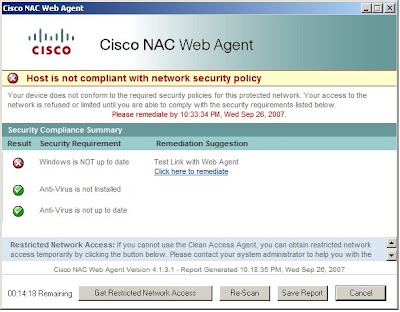
One of the much waited for features in the NAC 4.1(3) release is the NAC Web Agent. "The Cisco NAC Web Agent provides temporal vulnerability assessment for client machines. Users launch the Cisco NAC Web Agent executable, which installs the Web Agent files in a temporary directory on the client machine via ActiveX control or Java applet. When the user terminates the Web Agent session, the Web Agent logs the user off of the network and their user ID disappears from the Online Users list."
In short, it is a temporary agent that gives the ability to have a detailed posture assessment performed on a machine that it is not desired to or can't install software on.
The Spotlight:
The NAC Web Agent is a great addition to the capabilities of Cisco NAC Portfolio. The following is a functionality to agent type(CAA vs. Web Agnet) comparison. It includes some of the major benefits of each agent type to give everyone a better idea of where the new NAC Web Agent fits into their deployment.
Cisco Clean Access Agent
- Favorable end user experience - After the CAA is installed, the user does NOT have to open up a web browser every time NAC has to perform Authentication and Posture Assessment.
- Active Directory SSO - Without the CAA, internal users cannot perform ADSSO.
- Automatic Remediation - CAA walks users step-by-step through what they need to do to become compliant.
Cisco NAC Web Agent
- No Administrative Rights Required - The Web Agent only requires the rights to run Java or Active-X by the browser for it to successfully install and perform posture assessment. Some guests/visitors do not have the administrator rights necessary to install the full blown CAA, which makes the Web Agent very attractive.
- No permanent software installation - Using the Web agent takes away any chance of someone complaining of the software they downloaded at your location is the reason their computer crashed.
- Detailed Posture Assessment - The Web Agent can perform the same exact checks(Registry, File, Service, and Application) as the CAA. The only caveat is that the remediation is a manual process. The administrator may present a link to the user, but after remediation the user must click "Re-Scan" to be permitted access.
- Scan cannot be blocked by a personal firewall - As basic as this sounds, the Network Scanning capability is used a lot in the field to perform scans of guests and contractors. The problem is that a majority of users today are running some form of personal firewall rendering the network scanning useless. The NAC Web Agent is run locally on the machine to enforce posture assessment, which puts network scanning on the back burner.
 The final step is to assign requirements to the roles that requires the web agent.
The end user experience:

Sources: 4.1(3) Release Notes; 4.1(3) CAM Installation & Configuration Guide
One of the much waited for features in the NAC 4.1(3) release is the NAC Web Agent. "The Cisco NAC Web Agent provides temporal vulnerability assessment for client machines. Users launch the Cisco NAC Web Agent executable, which installs the Web Agent files in a temporary directory on the client machine via ActiveX control or Java applet. When the user terminates the Web Agent session, the Web Agent logs the user off of the network and their user ID disappears from the Online Users list."
In short, it is a temporary agent that gives the ability to have a detailed posture assessment performed on a machine that it is not desired to or can't install software on.
Figure 1 – Cisco NAC Web Agent

The Spotlight:
The NAC Web Agent is a great addition to the capabilities of Cisco NAC Portfolio. The following is a functionality to agent type(CAA vs. Web Agnet) comparison. It includes some of the major benefits of each agent type to give everyone a better idea of where the new NAC Web Agent fits into their deployment.
Cisco Clean Access Agent
- Favorable end user experience - After the CAA is installed, the user does NOT have to open up a web browser every time NAC has to perform Authentication and Posture Assessment.
- Active Directory SSO - Without the CAA, internal users cannot perform ADSSO.
- Automatic Remediation - CAA walks users step-by-step through what they need to do to become compliant.
Cisco NAC Web Agent
- No Administrative Rights Required - The Web Agent only requires the rights to run Java or Active-X by the browser for it to successfully install and perform posture assessment. Some guests/visitors do not have the administrator rights necessary to install the full blown CAA, which makes the Web Agent very attractive.
- No permanent software installation - Using the Web agent takes away any chance of someone complaining of the software they downloaded at your location is the reason their computer crashed.
- Detailed Posture Assessment - The Web Agent can perform the same exact checks(Registry, File, Service, and Application) as the CAA. The only caveat is that the remediation is a manual process. The administrator may present a link to the user, but after remediation the user must click "Re-Scan" to be permitted access.
- Scan cannot be blocked by a personal firewall - As basic as this sounds, the Network Scanning capability is used a lot in the field to perform scans of guests and contractors. The problem is that a majority of users today are running some form of personal firewall rendering the network scanning useless. The NAC Web Agent is run locally on the machine to enforce posture assessment, which puts network scanning on the back burner.
Configuring Cisco NAC Web Agent:
The good news is if you have ever configured posture assessment for the CAA, then you have already configured posture assessment for the Cisco NAC Web Agent. For more information on configuring Posture Assessment, check out the CAM Installation & Configuration Guide or Cisco NAC Chalk Talk 5. The only background that should be mentioned is when creating requirements for the Web Agent it is a best practice to use a Link type requirement, so that the end user can click on the appropriate link to remediate.
The first step to enabling the web agent is to create a or modify your existing User Page. The most important option is the "Web Client (ActiveX/Applet)" setting which tells NAC which type of web agent to use or prefer. e.g. Active X or Java
The next step is to require the use of the Web Agent for the relevant Roles.
Figure 2 – Require the use of the Cisco NAC Web Agent
 The final step is to assign requirements to the roles that requires the web agent.
The end user experience:
Figure 3 – Cisco NAC Web Agent end user process flow

Summary:
The Cisco NAC Web Agent is definitely going to be a highly used feature in most Cisco NAC deployments. It is fairly straight forward to understand and configure. I encourage everyone to check it out along with all the great new features in 4.1(3).
Sources: 4.1(3) Release Notes; 4.1(3) CAM Installation & Configuration Guide
Subscribe to:
Posts (Atom)
